Lighting, fan curves, and pump-LCD dashboards for every brand in your PC. One tray app instead of four vendor launchers. No account, no telemetry, no subscription.
v1.2.6 · one self-contained .exe · no installer,
no .NET · free and GPLv2
Rainbows, meteors, plasma, aurora, candle, rain, Matrix. Audio-reactive bars and pulses that move the instant sound does. Keys that ripple when you press them. Screen ambient, Wallpaper Engine capture, and Razer Chroma game sync with no Razer software installed.
Run one effect everywhere, or a different one on each fan ring.
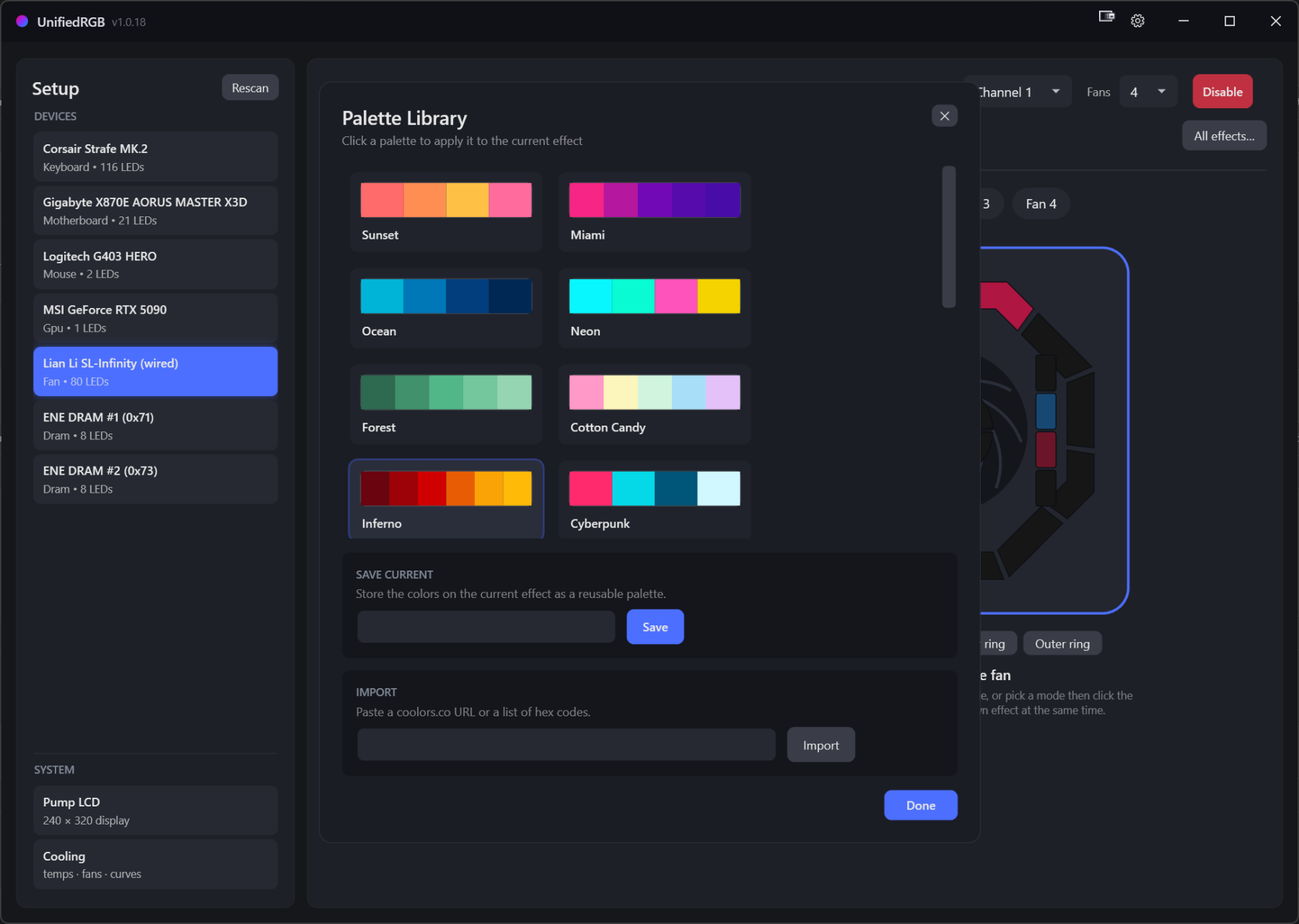
A real wheel, with brightness, hex, and RGB entry. The Palette Library keeps presets and your own sets, and imports straight from a coolors.co link or a pasted list of hex codes.
Color calibration trims each device until the same white looks the same on all of them, whatever LEDs and plastic its vendor used.
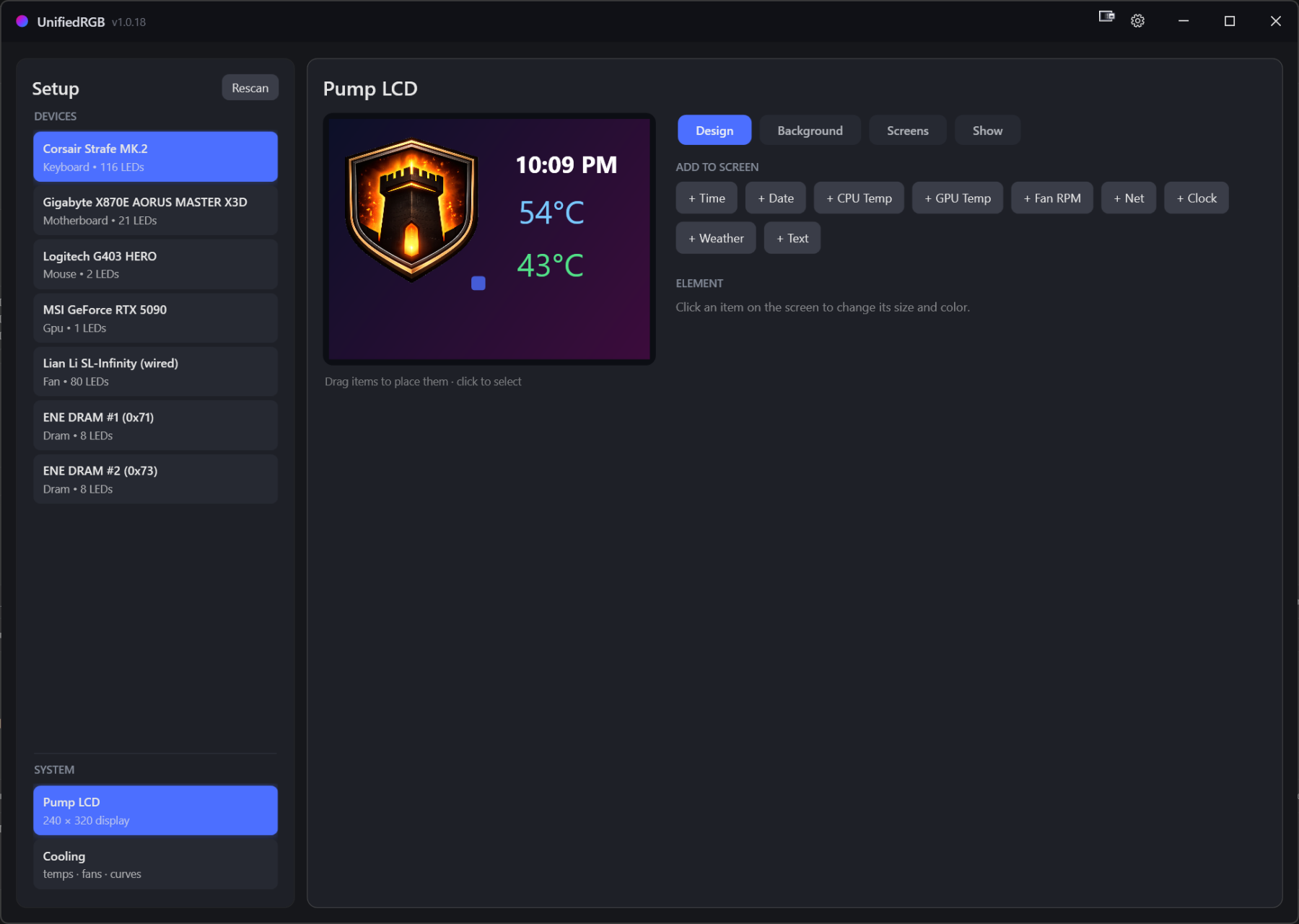
Drag CPU and GPU temps, clocks, date, fan RPM, network throughput, weather, and what's playing with its album art onto a Thermalright 240×320 screen. Put your own image or GIF behind them. Build several screens and sequence them.
A profile switch changes the lights and the pump screen together. If the panel's firmware locks up and the screen goes dark, the app restarts the panel itself.
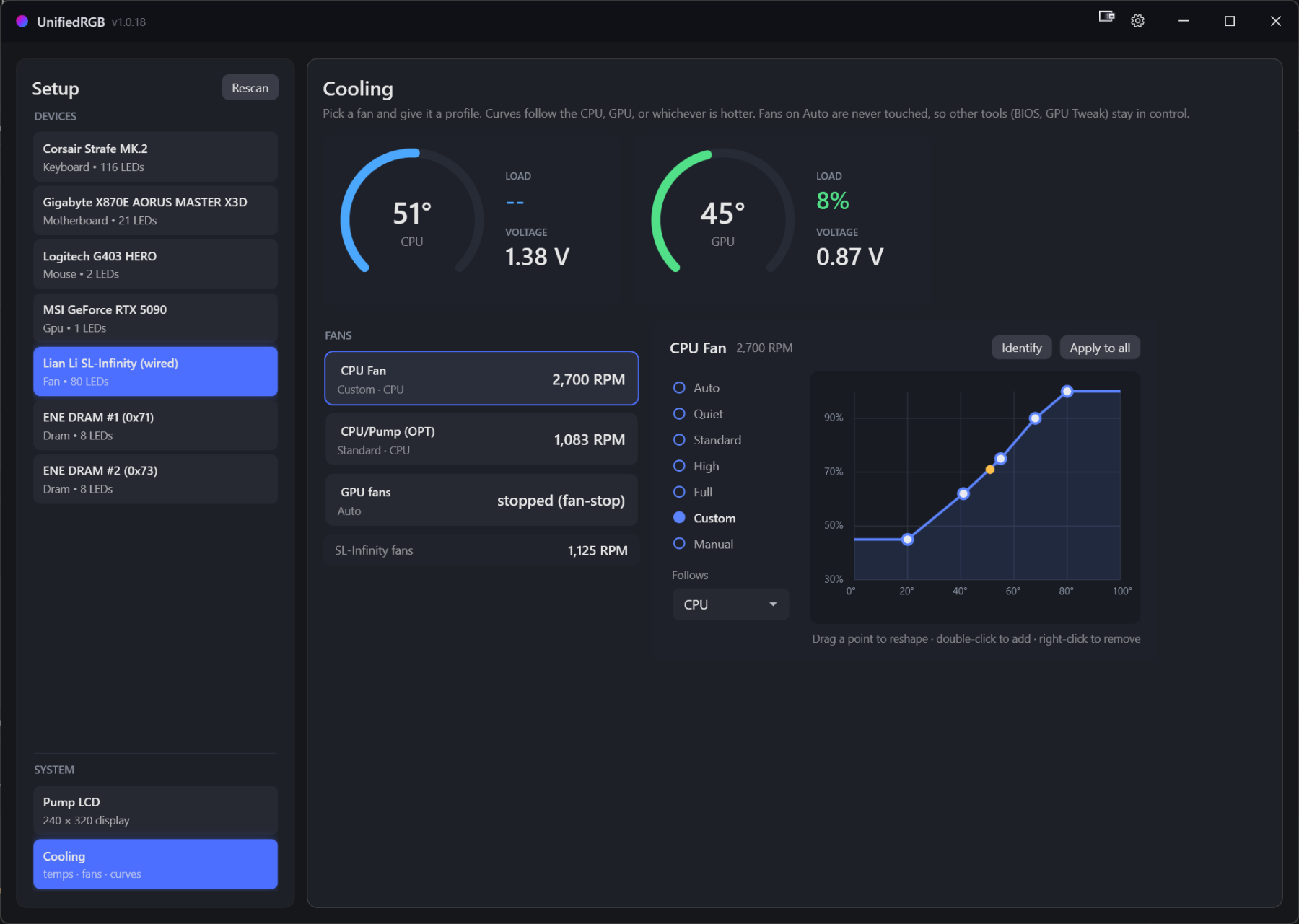
Curves follow the CPU, the GPU, or whichever runs hotter. Live gauges, per-fan profiles, drag-to-edit points, and a failsafe at 96 °C CPU or 90 °C GPU that hands the fans back to the BIOS.
Fans left on Auto are never touched, so your BIOS profiles keep working.
With a Thermal Grizzly WireView Pro II on the GPU's power connector, you also see board power and the current on every pin.
Arrange your devices the way they sit in front of you, then run an effect on the desk instead of on each device. A wave rolls off the keyboard and up the case fans as one image, in the order they are really in.
It is also where you say where a device's LEDs physically are: a strip taped along a GPU is a line, a fan is a ring.
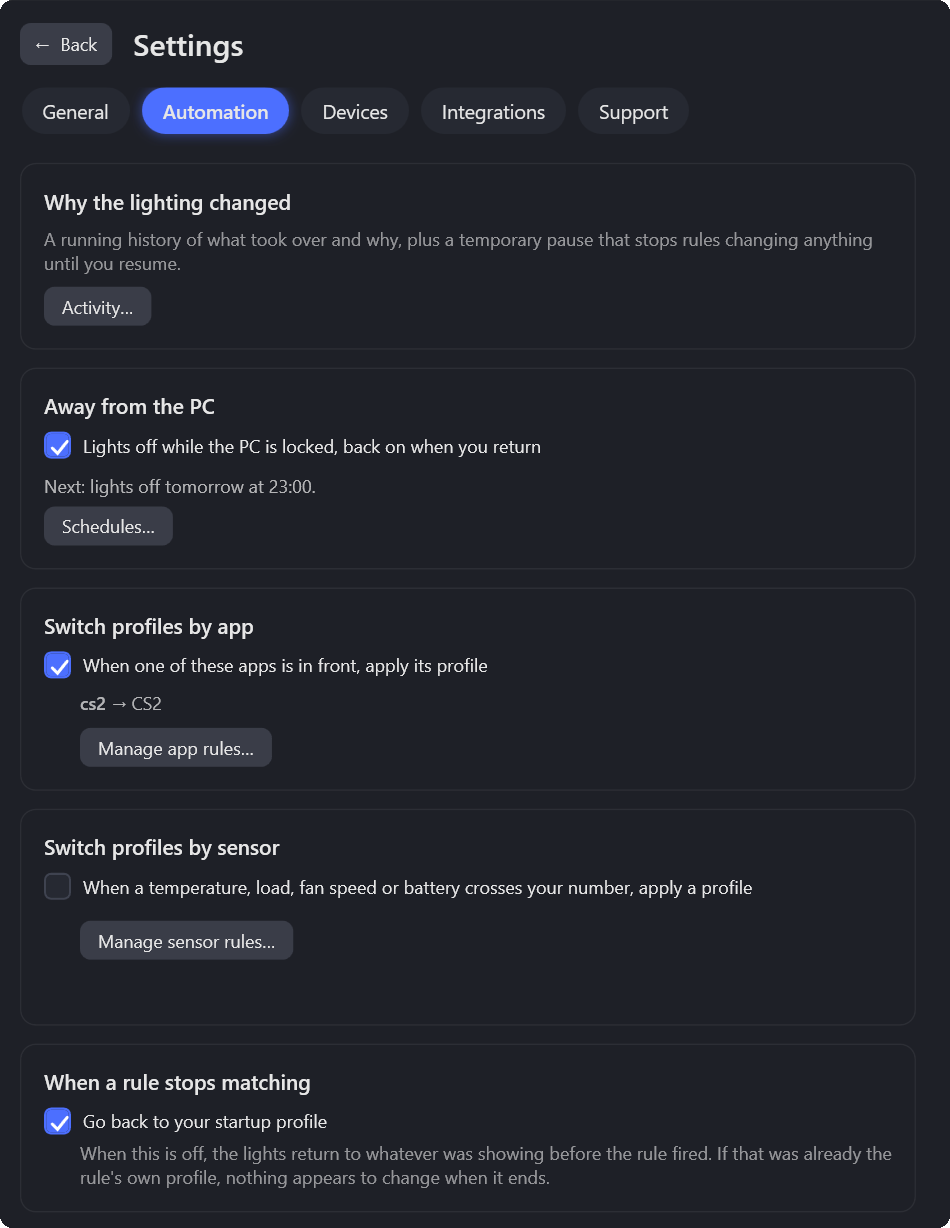
App rules, schedules, and rules on temperature, load, fan speed or a wireless battery. Lock the PC or put it to sleep and the lights go off until you're back. Counter-Strike 2 drives them from the game's own state, not by watching your screen: your health, every hit, kills, flashbangs, and a bomb that pulses faster as the fuse runs down.
When the lighting changes and you didn't change it, the activity log says which rule did.
Step through your profiles on a timer: lights, pump screen and wallpaper together.
Home Assistant, Stream Deck and anything else written for OpenRGB can drive your lights.
On exit, each device stays on a color, turns off, or goes back to its own profile.
Devices that drop off after sleep or a replug come back on their own.
About 14% of one core in the tray, with seven devices and the pump screen animating.
Ctrl+Alt+1…9 switches profiles, even in games. Ctrl+Alt+↑/↓ sets brightness.
Back up profiles, screens, shows and rules, and restore them on another PC.
Chroma games and Wallpaper Engine light your devices. No Razer software needed.
One click, checked against the release's SHA-256. Or turn the check off.
These are the other cross-vendor tools, built to drive your whole machine rather than one company's products. Single-brand software (iCUE, Synapse, L-Connect, RGB Fusion, Armoury Crate) isn't compared here, because it only lights its own hardware. That's the pile this replaces.
Every claim is about what the software does, not how good it is. Where a rival wins, that's on this page too.
| UnifiedRGB | OpenRGB | SignalRGB | Artemis | Aurora | |
|---|---|---|---|---|---|
| Price | Free, all features | Free | Free tier, paid Pro | Free | Free |
| License | GPLv2, open source | GPLv2, open source | Closed source | PolyForm Noncommercial source available |
MIT, open source |
| Lighting across brands | Yes | Yes | Yes | Yes | Yes |
| Breadth of devices | ~12 native families, plus the OpenRGB bridge |
1,200+ devices | Very large library | Per-brand plugins | Major peripheral brands |
| How it reaches hardware | Directly (HID, WinUSB, SMBus, I²C) | Directly | Its own drivers | RGB.NET plugins | SDK wrappers Colore, RGB.NET |
| Uses OpenRGB for the rest | One checkbox downloads and runs it for you; devices we drive natively are excluded |
It is OpenRGB | No, conflicts with it | Yes, once you install OpenRGB and start its server |
Yes, once you install OpenRGB and start its server |
| Fan curves | Yes, free | No, lighting only | Pro feature | No | No |
| Temps and monitoring | Yes, free | No | Pro feature | No | No |
| LCD screen dashboards | Yes, free | No | Custom faces are Pro | No | No |
| Game lighting sync | Chroma games, no Razer software | Third-party plugins | Many integrations | Deep profile engine | Its whole specialty |
| Other apps can drive your lights | Yes, built in speaks the OpenRGB protocol, so tools written for it work unchanged |
Yes, it defines the protocol | It connects to OpenRGB, rather than being driven |
It connects to OpenRGB, rather than being driven |
| Reacts to what is happening in a game | Yes, from the game's own state CS2, via Valve's Game State Integration |
No, lighting only | Yes, by reading your screen | Yes, through its plugins | Yes, its specialty |
| Account to use it | Never | Never | Sign-in for Pro | Never | Never |
| Ads or upsells | None | None | Ad-free is a Pro feature | None | None |
| Platforms | Windows 10/11 (x64) | Windows, Linux, macOS | Windows | Windows | Windows |
If one of these matters more to you, use that tool. You can run UnifiedRGB alongside most of them.
It's retired. rgbsync.com says so outright, and its team went on to build SignalRGB.
It also shows the difference in approach. JackNet drove the vendor apps through their SDKs, so iCUE, Aura, and Synapse all had to stay installed underneath it. UnifiedRGB talks to the hardware itself. That's more work per device, which is why our list is shorter, and it's why nothing else is left running on your machine.
Native drivers, talking straight to the hardware. Anything not listed can still run through the optional OpenRGB bridge, and hardware we drive natively is never handed to it.
| Device | How it's driven |
|---|---|
| Corsair Strafe MK.2 | HID |
| SteelSeries Apex Pro TKL Gen 3 and Apex Pro TKL (2023) | HID |
| Gigabyte RGB Fusion 2 boards (IT5711, IT8297) and their ARGB headers | HID |
| Logitech G403 HERO | HID++ 2.0 |
| Razer Basilisk V3 Pro and V3 Pro 35K (lighting, battery) | HID, no Synapse |
| Razer Kraken V3 X headset | HID, no Synapse |
| SayoDevice E1 | HID |
| MSI GeForce RTX cards (Gaming Trio and similar) | I²C via NvAPI |
| ENE DRAM (G.Skill and others) | SMBus via PawnIO |
| Lian Li SL-INF wireless fans pair once in L-Connect 3, then close it | WinUSB and RF |
| Lian Li SL-Infinity wired hub | HID |
| Thermalright pump LCD (Frozen Warframe, 240×320) | HID |
| AMD Ryzen CPU temperature | PawnIO |
| NVIDIA GPU temperature and fan control | NvAPI |
| Motherboard fan headers | Super I/O via PawnIO |
| Thermal Grizzly WireView Pro II (GPU power, per-pin current) | USB serial |
Missing your hardware? Open a device request. Protocol notes and USB captures are the fastest route to a driver.
Direct hardware access means kernel-level access. CPU temperature, DRAM lighting, and motherboard fans need PawnIO, a signed, module-constrained kernel driver, which the app offers to install with one click. Know that before you say yes.
It follows OpenRGB's proven ENE detection and writes only to controllers that have identified themselves as ENE. As with every tool in this category, writing to the wrong SMBus device can permanently damage hardware.
A signing certificate costs money this project doesn't take, so SmartScreen warns on first run. Click More info, then Run anyway. Every release publishes a SHA-256, and you can build it yourself.
Free, with no paid tier to upsell you to. The whole thing is on GitHub under GPLv2, including the reverse-engineered device protocols. The catch is the honest one: it supports far less hardware than the big tools, and one person maintains it.
Once at startup, to check GitHub Releases for a new version, and you can switch that off. Everything else follows something you did: downloading an update, installing PawnIO, turning on the OpenRGB bridge, or adding a weather widget to the pump screen, which asks wttr.in every 15 minutes and so shares your IP address with it. No telemetry, no analytics, no account. The "Report a problem" button writes a file to your Desktop and opens a pre-filled GitHub issue, and nothing is uploaded unless you post it. This website has no trackers and loads nothing from third parties either.
It bundles the whole .NET runtime, so there's nothing to install and no framework to keep in sync. One file that runs. Turn on Start with Windows and it copies itself to Program Files, so the copy that runs as administrator at logon is one other programs can't replace.
Usually, but two programs writing the same device will fight over it and the lighting flickers between them. Let UnifiedRGB own what it drives natively and close the vendor app. Lian Li wireless fans are the exception to "usually": pair them once in L-Connect 3, then close it, because both want the receiver. UnifiedRGB's own OpenRGB bridge never touches hardware it already drives.
First check Settings, Devices: if the hardware is plugged in but another program holds it, or it needs the sensor driver, UnifiedRGB now says so there, with the fix. Otherwise try the OpenRGB bridge. It covers over a thousand devices and turns on with one checkbox, which downloads OpenRGB from its official releases. If that misses too, open a device request. Captures and protocol notes make a driver far more likely.
No. It's a Windows app, and the kernel-access parts are Windows-specific. On Linux, OpenRGB is the right answer.
One app, one download, and nothing else left running.